



Instagram Tagging Guide: How To Tag People and Automate Tag Engagement with JarveePro
Introduction
Instagram offers countless ways to increase visibility, build relationships, and grow engagement, but one feature remains surprisingly underutilized: Instagram tagging.
Most users view tags as a simple way to mention friends or collaborators. However, experienced marketers understand that tagging can be a powerful engagement strategy because Instagram actively notifies tagged users and often surfaces tagged content directly within their activity and messaging experience.
This means tagging can help your content reach the exact people you want to engage with, creating opportunities for profile visits, likes, comments, conversations, and even business partnerships.
In this guide, you'll learn how to tag people on Instagram posts, what happens after someone is tagged, why tagging improves engagement, and how JarveePro can automate engagement with tagged posts to help scale your Instagram marketing efforts.
What Is an Instagram Tag?
An Instagram tag is a direct association between a piece of content and another Instagram account.
When you tag someone in:
A photo post
A carousel post
A Reel
Instagram links that content to the tagged account and notifies them about the interaction.
Unlike hashtags, which help categorize content, tags are designed to connect specific users directly to a post.
This makes tagging one of the most targeted forms of engagement available on Instagram.
How To Tag People On Instagram Posts
Step 1: Create a New Instagram Post
Open Instagram and click the Create button.
Upload:
A single image
Multiple images (carousel)
A Reel
Edit your content as needed before continuing to the final publishing screen.
Step 2: Select "Tag People"
Before publishing, Instagram provides an option called:
Tag People
Click this option.
Instagram will allow you to:
Tap directly on the image
Search for usernames
Select accounts to tag
You can tag:
Customers
Influencers
Team members
Brand partners
Clients
Friends
Step 3: Add Relevant Tags
Search for the Instagram usernames you want to tag.
Choose only accounts that are directly relevant to the content.
Relevant tagging generally produces significantly better engagement than mass tagging random accounts.
Step 4: Review and Confirm
Double-check:
Username accuracy
Tag placement
Post content
Then save the tags.
Instagram will display tagged usernames directly within the post.
Step 5: Publish Your Post
Click Share.
Once published, Instagram begins processing notifications for tagged users.
This is where tagging becomes especially powerful.
What Happens When You Tag Someone on Instagram?
Many users assume tagging simply places a username on a photo.
Instagram actually does much more.
When someone is tagged:
Instagram generates a notification
The tagged user can see the tagged content quickly
The post may appear in their tagged content area
Instagram may surface the content through its activity and messaging ecosystem
The tagged user can immediately visit the post
This creates a direct visibility channel between your content and the tagged account.
Instead of relying solely on Instagram's algorithm to distribute your post, tagging helps place your content directly in front of specific users.
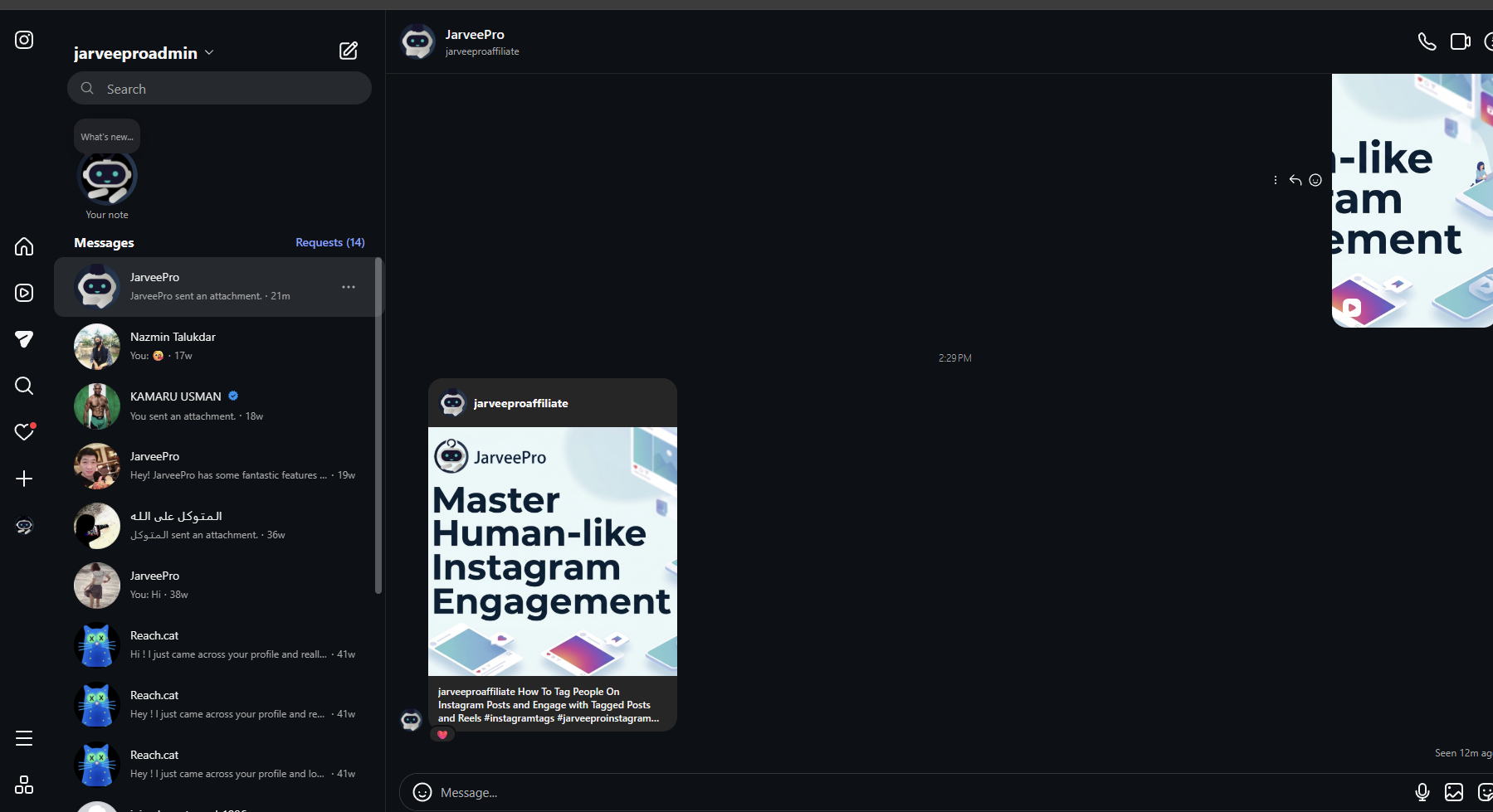
Do Tagged Instagram Posts Show Up in Direct Messages?
One of the biggest advantages of tagging is visibility.
Instagram often surfaces tagged content prominently through user notifications and activity systems.
For many users, tagged content becomes highly visible and easily accessible shortly after publication.
This means that when you tag someone, there is a strong chance they will notice the content much faster than they would discover it organically through their feed.
For marketers and businesses, this creates a valuable opportunity to capture attention from highly targeted users.
Benefits include:
Faster content discovery
More profile visits
Increased engagement opportunities
Higher interaction rates
Better relationship building
This is one reason why strategic tagging often produces better engagement than simply publishing content and hoping the algorithm delivers it.
Why Instagram Tags Increase Engagement
Tagging creates a second discovery channel.
Normally, Instagram users find content through:
Home feed
Explore page
Reels feed
Hashtags
When you tag someone, Instagram introduces an additional visibility path.
The tagged account receives direct awareness that the content exists.
This can generate:
Immediate Attention
Tagged users often review content shortly after receiving a notification.
Increased Profile Visits
Many tagged users click through to see who tagged them.
More Comments and Likes
Direct visibility naturally increases the chance of engagement.
Better Networking Opportunities
Tagging can help initiate conversations with creators, influencers, customers, and business partners.
Enhanced Brand Exposure
Brands frequently monitor tagged content to discover user-generated content and customer feedback.
Best Practices for Instagram Tagging
To maximize results:
Tag Relevant Accounts
Only tag users directly connected to the content.
Avoid Spam Tagging
Tagging unrelated users can reduce effectiveness and damage credibility.
Use Tags Strategically
Focus on people likely to engage with the content.
Combine Tags with Quality Content
The best tagging strategy still requires valuable content.
Engage Back
If someone responds after being tagged, continue the conversation.
Relationship building is often where the biggest value comes from.
The Challenge of Managing Tagged Content at Scale
As your Instagram presence grows, managing tagged content manually becomes increasingly difficult.
Businesses often need to monitor:
Brand mentions
Customer tags
Influencer campaigns
Affiliate promotions
Community engagement opportunities
Checking these manually every day can consume significant time and resources.
This is where automation becomes essential.
How JarveePro Automates Instagram Tag Engagement

JarveePro helps marketers, agencies, affiliate marketers, and social media managers automate engagement workflows around tagged content.
Instead of manually searching Instagram for opportunities, JarveePro can help streamline the process.
Monitor Tagged Posts
Discover content where specific accounts have been tagged.
Identify Engagement Opportunities
Find posts involving your niche, products, services, or target audience.
Automate Interactions
Like, react to, or engage with tagged content according to your campaign settings.
Scale Relationship Building
Maintain consistent activity across multiple Instagram accounts.
Save Hours of Manual Work
Reduce repetitive engagement tasks while keeping campaigns active.
Take a look at video demo
Why Instagram Tag Engagement Is So Powerful
Most Instagram growth strategies focus on reaching people indirectly.
Tagging is different.
It creates direct visibility.
When someone receives a tag notification, your content has a significantly higher chance of being seen compared to ordinary posts competing in crowded feeds.
This makes tagged content one of the most valuable engagement opportunities available on Instagram.
Combined with automation, marketers can systematically identify and engage with these opportunities at scale.
Why Marketers Use JarveePro for Instagram Growth
JarveePro is designed for users who need more than basic scheduling.
While traditional tools focus primarily on publishing content, JarveePro helps automate engagement activities that drive actual growth.
Benefits include:
Instagram engagement automation
Tagged post engagement
Audience discovery
Lead generation workflows
Relationship building campaigns
Multi-account management
Scalable Instagram marketing
For agencies, brands, affiliate marketers, and growth-focused businesses, this can dramatically improve efficiency while maintaining consistent activity.
Conclusion
Instagram tagging is far more than a simple mention feature.
When you tag someone, Instagram actively notifies the tagged account and helps surface the content through its visibility systems, increasing the likelihood that your post will be seen and engaged with.
For marketers, this creates a powerful opportunity to generate targeted engagement, build relationships, and increase brand visibility.
And when combined with JarveePro's Instagram Tag Engagement automation, tagging becomes a scalable growth strategy capable of producing consistent results across multiple campaigns and accounts.
If you're serious about Instagram growth, tagging should be part of your engagement strategy—and automating that process with JarveePro can help take it to the next level.